http://en.wikipedia.org/wiki/Touchstone_pictures
Originally I was going to open my film with a Touchstone Pictures title but as Touchstone Pictures work under the company of Disney most films are not very explicit. Here are a few of the know films that Touchstone Pictures company have made Pretty Woman, Dead Poets Society, Sister Act, The Insider, Ernest Goes to Camp, Who Framed Roger Rabbit, Rushmore, The Royal Tenenbaums, and Good Morning Vietnam. These films mostly are aimed towards a younger audience, this means that for my film the Touchstone Pictures Title would not be used as it dosent tend to make the film genre type that my film trailer is, my film is also aimed to the older age group of people.
http://en.wikipedia.org/wiki/Universal_Studios_Home_Entertainment
A more suitable film company title opening for my film would be Universal Studios as Universal Studios Film company tends to make more adult/explicit films etc. For example the film 'The Fourth Kind' etc.
http://www.universalpictures.com/
Thursday, October 22, 2009

How I made the soundtrack for the trailer
To make the soundtrack for my film teaser trailer I used a program called GarageBand on an Apple MacBook laptop. Below is a series of images which I screen shot to show what I did and how I made my soundtrack for my thriller teaser trailer.


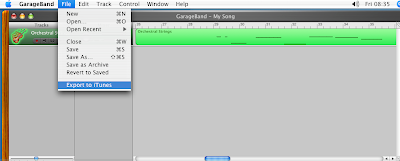

The first thing I did was make a new project on Garageband, I did this by selecting file then new project, I then I added a new track by selecting track, then new track. By selecting this I then had the option of what type of instrument I wanted to use for the track.

I chose strings and then chose the type of strings to be Orchestral Strings; I found this sound after looking for a while through the instrument section. I chose it because it sounded the spookiest and it would suit my trailer the best.

I then used the keyboard to make my own tune for my trailer with the orchestral strings instruments. I made the buttons of my laptop correspond to the keyboard on the laptop playing the tune.

I then recorded the tune on to Garageband, the tune I made had to go with the trailer so I used the layout trailer video I had made and played the video on QuickTime Player to watch whilst recording the tune/soundtrack. 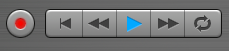

All I had to do to record the track was press the record button; the picture above shows what the button looks like. When you are recording the dark red record button lights up and becomes a brighter red colour.

On the keyboard you are able to change the pitchbend, modulation, octave and velocity levels.

After I had made the track, I changed the levels on the volume to make it prefect for the soundtrack for my trailer, I was also able to change the side from left or right for the sound on the speaker/sound system.

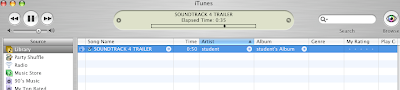
Once I had made the tune for the soundtrack I pressed file and then went down to ‘Export to iTunes’ and after I chose the quality of the track and then, clicked export. After this it was in iTunes ready to be added to the film trailer.

After it had been imported into iTunes I was able to place the audio track at the playhead in the video editing program- iMovie HD. Then move it to be where I wanted it to start playing in the video/trailer etc.
How I made the film
The video below explains how I made the titles for my film using the program Adobe After Effects. Please watch the full video for a full explanation of how I made the titles for my film.
This video below explains how I made my film using the program iMovie on an Apple Mac computer, it shows the processes that I used to make it. Please watch the full video for a full understanding.
Monday, October 19, 2009
Subscribe to:
Comments (Atom)
